GanttTool
AI Gantt Chart Generator - Create and edit professional Gantt charts with natural language. Free online Gantt chart maker with task dependencies and milestones.
Build & Edit Gantt Charts with AI
Describe your project in plain language and the AI assistant builds it — tasks, dates, dependencies, and milestones. Powered by PlantUML. Export to SVG, PNG, or code in minutes.
Unlimited projects, no watermarks, no account required.
Example of an exported Gantt chart
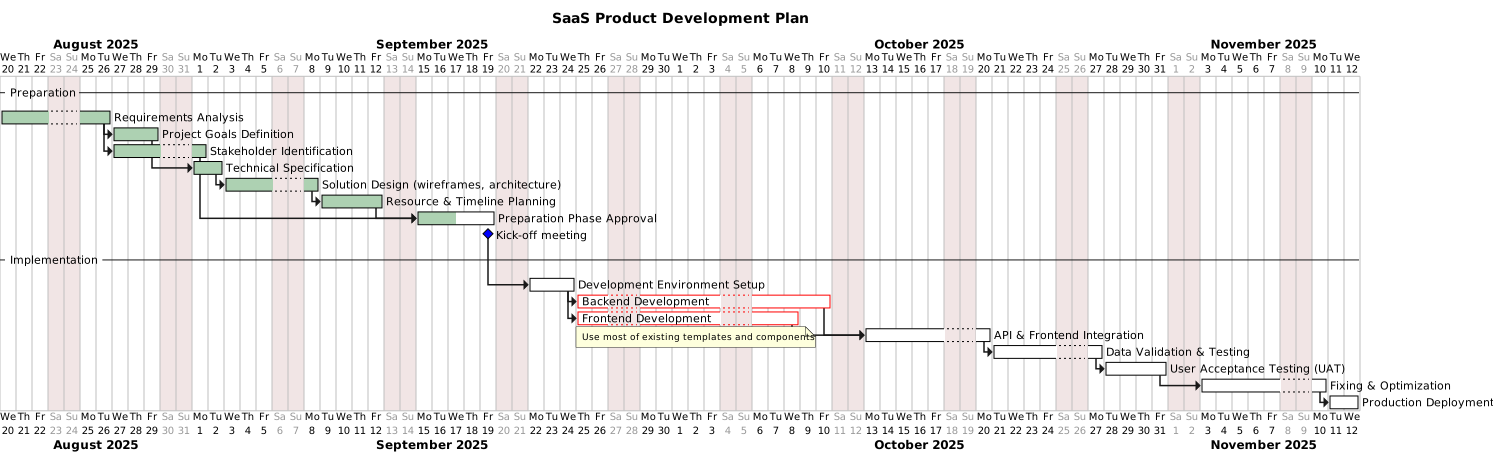
Edit your chart with natural language
Just describe what you need. AI understands and instantly updates your entire project — tasks, dates, dependencies, milestones.
"Add milestone 'Beta release' 2 days after testing"
Added milestone "Beta release" scheduled 2 days after Data Validation & Testing ends.
Everything you need
Powerful features wrapped in a beautifully simple interface
Visual Planning
Create professional Gantt diagrams with intuitive task management and timeline visualization
Smart Dependencies
Define task relationships with automatic cycle detection and dependency validation
Export Anywhere
Download as SVG, copy as PNG, or get the PlantUML code for maximum flexibility
What is a Gantt Chart?
A Gantt chart is a visual project management tool that displays tasks, milestones, and dependencies on a timeline. It helps project managers plan, schedule, and track project progress. With GanttTool, you can easily create professional Gantt diagrams using PlantUML syntax.
How to Create a Gantt Chart Online in 3 Steps
Define Your Tasks
List all project tasks with their start and end dates. Enter tasks in simple PlantUML syntax.
Add Dependencies
Connect tasks to show relationships. Want to see how task B depends on task A? Just add a dependency.
Export& Share
Download your Gantt chart as PNG, SVG, or PDF. No registration — your work is automatically saved locally.
Who Uses GanttTool?
Software Development
Marketing Campaigns
Event Planning
Construction Projects
Everything You Need
Powered by Modern Technology
PlantUML
Powered
Auto-save
LocalStorage
Privacy
No tracking
Free
Forever
Frequently Asked Questions
Everything you need to know about GanttTool
01Is GanttTool really free?
Is GanttTool really free?
Yes! GanttTool is 100% free with no limits. No premium features, no registration, no hidden costs. Create unlimited Gantt charts.
02How do I create a Gantt chart online for free?
How do I create a Gantt chart online for free?
Simply enter your tasks in our editor using simple text syntax. The tool generates a professional Gantt chart that you can customize and export.
03Can I export my Gantt chart?
Can I export my Gantt chart?
Absolutely! Export your Gantt charts as PNG, SVG, or PDF. Perfect for presentations and documents.
04Do I need to sign up?
Do I need to sign up?
No registration required. GanttTool works entirely in the browser with auto-save to local storage.
05What's the difference between Gantt chart and Gantt diagram?
What's the difference between Gantt chart and Gantt diagram?
Nothing — these terms are interchangeable. 'Gantt diagram' is more common in European languages, while 'Gantt chart' is the US standard.
06Can AI create my Gantt chart?
Can AI create my Gantt chart?
Yes. Just describe your project in plain language — for example 'add a testing phase after development' — and the AI assistant builds and updates tasks, dates, dependencies, and milestones for you. No syntax to learn.
07How does the AI assistant work?
How does the AI assistant work?
Type what you want in everyday words and the assistant instantly edits your whole chart — adding tasks, setting completion, changing the timeline scale, or creating milestones. You stay in control and can fine-tune everything manually too.
08What can I ask the AI assistant to do?
What can I ask the AI assistant to do?
You can ask it things like: 'Add a design phase lasting 2 weeks before development', 'Set the testing task to 80% complete', 'Move the launch milestone to the end of the month', or 'Add Alice as a resource to all frontend tasks'. The assistant understands natural language and makes the changes in seconds — no need to click through menus.
Rated 4.8/5 by project managers