What Is a Gantt Chart?
A complete guide to Gantt charts: history, structure, waterfall project planning, and how to read every element — phases, tasks, milestones, dependencies, and more.
Definition & History of the Gantt Chart
A Gantt chart is a horizontal bar chart that visualises a project schedule over time. Each task or activity is represented as a bar spanning from its start date to its end date on a shared timeline. At a glance, you can see what work needs to happen, when it happens, how long it takes, and how tasks relate to each other.
The chart is named after Henry Laurence Gantt (1861–1919), an American mechanical engineer and management consultant. Gantt developed the format around 1910–1915 while working on production scheduling for manufacturing plants. His charts were used extensively to plan and track munitions production during World War I, proving their value in large-scale, complex operations.
Historical note: Polish engineer Karol Adamiecki independently developed a similar chart called the "harmonogram" around 1896 — pre-dating Gantt by nearly two decades — but his work was not widely published in English until much later. Henry Gantt's chart gained broader adoption in the English-speaking world, and the name stuck.
Over the following century, Gantt charts evolved from hand-drawn paper grids to sophisticated digital tools. Today, they are the most widely used visual format for project scheduling in construction, software development, manufacturing, marketing, research, and virtually every other industry that requires coordinated multi-step work.
Why have Gantt charts remained relevant for over 100 years?
Their longevity comes from a simple insight: humans understand time-based information most naturally as a visual timeline. A Gantt chart transforms an abstract list of tasks into a concrete picture of how a project unfolds — making it easy to communicate plans to stakeholders, spot scheduling conflicts, and track progress against baselines.
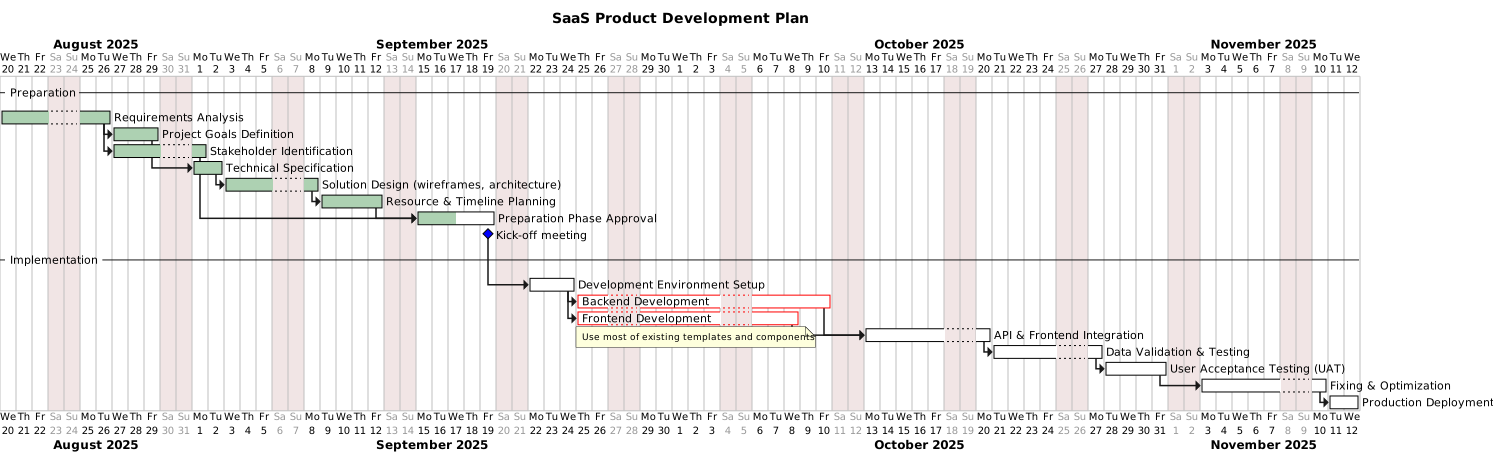
A Gantt diagram generated with GanttTool showing phases, tasks, milestones, and task dependencies.
Waterfall Methodology & Where Gantt Charts Fit
Waterfall project management is a linear, sequential approach to planning and executing work. It is called "waterfall" because each phase flows downward into the next — you must complete one stage before the next begins, just like water cascading down a series of steps.
A typical waterfall project moves through stages such as:
- Requirements gathering — Define what needs to be built or delivered.
- Design — Architect the solution and create detailed specifications.
- Development / Execution — Build the product, construct the structure, or execute the plan.
- Testing / Quality assurance — Verify that the output meets requirements.
- Deployment / Delivery — Release or hand over the finished work.
- Maintenance / Closure — Support the delivered product and document lessons learned.
Gantt charts are the natural scheduling tool for waterfall projects. Because waterfall phases have clear start and end points, well-defined deliverables, and known dependencies between them, they map directly onto the bar-chart format. A Gantt chart lets you see exactly when each phase starts, how long it runs, which tasks fall inside each phase, and what milestones mark the transition from one stage to the next.
Key insight: Waterfall does not mean "rigid." Even in waterfall projects, you may iterate within a phase, run tasks in parallel where dependencies allow, and adjust timelines as new information arrives. A Gantt chart makes those adjustments visible and communicable to the whole team.
The relationship between phases and the timeline
In a Gantt chart, project phases are often shown as separator rows (also called "section headers" or "phase banners") that group the tasks belonging to that phase. The timeline at the top shows calendar dates — days, weeks, or months depending on the project scale — allowing you to plan and track work against real deadlines.
Anatomy of a Gantt Diagram
A modern Gantt chart contains several distinct elements. Understanding each one lets you build diagrams that are both accurate and easy to read.
Phases / Separators
Phase separators divide the diagram into logical sections, each representing a project stage (e.g., "Design," "Development," "Testing"). They act as visual headers that group related tasks, making large projects scannable at a glance. In GanttTool they appear as full-width section banners on the timeline.
Tasks
Tasks are the core work items of your project. Each task has a name, a start date, a duration, and appears as a horizontal bar on the chart. The length of the bar is proportional to its duration. Tasks can run sequentially or in parallel, and their bars may overlap on the timeline when independent work streams happen simultaneously.
Milestones
Milestones mark significant checkpoints in a project — moments of achievement rather than spans of work. They have zero duration and are typically shown as a diamond or marker on the timeline. Common milestones include "Design approved," "MVP released," or "Client sign-off." They are essential for tracking project health and communicating progress to stakeholders.
Dependencies
Dependencies define the relationships between tasks — which tasks must finish before another can start. The most common type is "Finish-to-Start" (Task B cannot begin until Task A is complete). Dependencies are shown as arrows connecting task bars. They enforce logical sequencing and help identify the critical path — the longest chain of dependent tasks that determines the project's minimum duration.
Timeline / Time Scale
The horizontal axis of a Gantt chart is the timeline. It can be scaled daily, weekly, or monthly depending on project length. A zoom level lets you drill into detail or pull back for a high-level overview. Most tools also display a "today marker" — a vertical line showing the current date — making it easy to see how actual progress compares to the plan.
% Completion
Progress tracking is built into Gantt charts through percentage completion (0%–100%). A partially completed bar is visually shaded or filled to show how much work is done. At a glance, you can see which tasks are on track, ahead, or behind schedule relative to the today marker. Aggregate completion across all tasks gives a quick project-health snapshot.
Resources
Resources are the people, teams, or assets assigned to tasks. Adding resource labels to task bars answers the question "who is doing this?" and reveals potential over-allocation (one person assigned to too many simultaneous tasks). Resources can also carry partial allocations (e.g., "Alice: 50%") to reflect split time across projects. Visibility of resource loading is one of the most practical benefits a Gantt chart offers over a simple to-do list.
When to Use Waterfall / Gantt vs. Agile
Both waterfall/Gantt and agile approaches have genuine strengths — the right choice depends on the nature of your project. Here is a practical comparison:
| Factor | Waterfall + Gantt chart | Agile (Scrum / Kanban) |
|---|---|---|
| Requirements | Well-defined upfront, unlikely to change | Evolving, discovered iteratively |
| Project scope | Fixed scope with clear deliverables | Flexible scope; backlog is reprioritised each sprint |
| Team structure | Specialised roles working in sequence | Cross-functional teams working in parallel sprints |
| Client involvement | Heavy upfront, then reviews at milestones | Continuous feedback after each sprint |
| Risk profile | Low-risk, known technology, stable environment | Higher uncertainty; frequent course-correction expected |
| Typical industries | Construction, manufacturing, government, events, large IT rollouts | Software product development, startups, UX research |
| Planning artefact | Gantt chart, WBS, critical path diagram | Sprint backlog, Kanban board, burn-down chart |
The hybrid approach
Many real-world projects blend both methodologies. A construction project might use a waterfall Gantt chart for the overall programme (site preparation → structural work → fit-out → handover) while allowing agile iteration within the design phase. Conversely, a software product team running two-week sprints might still use a high-level Gantt chart to track quarterly release milestones and dependencies on external teams.
The decision rule of thumb: use a Gantt chart whenever you need to commit to a timeline, communicate a plan to stakeholders outside your immediate team, or coordinate work across multiple teams or contractors. It is the clearest way to show who does what and when.
Pro tip: You can start with a high-level Gantt chart during project initiation to secure stakeholder approval, then manage day-to-day work on a Kanban board within each phase. Review the Gantt chart weekly to confirm phase-level dates are still on track.
Start Building Your Gantt Chart
Now that you understand what a Gantt chart is and how it fits your project planning process, you are ready to build one. GanttTool is a free, browser-based Gantt chart editor with a visual task editor, drag-and-drop reordering, dependency management, AI-powered planning assistant, and instant SVG export — no account required.
- Add tasks, milestones, and phases in seconds.
- Set dependencies and let the timeline auto-adjust.
- Type a project description and let the AI assistant generate a draft Gantt chart.
- Export as SVG or copy to clipboard as a PNG.
Ready to create your first Gantt chart?
Build a professional Gantt diagram in minutes — free, no account required. Describe your project and let the AI assistant draft it for you.
Open GanttTool — it's freeRelated Articles
How to Create a Gantt Chart Online
Step-by-step tutorial for building a Gantt chart from scratch with GanttTool.
AI Gantt Chart Assistant
How GanttTool's AI understands plain-English instructions and auto-generates tasks.
PlantUML Gantt Diagram Format
Deep dive into PlantUML syntax — tasks, milestones, colors, and advanced styling.